contextual-neural-map
Contextual Neural Map




Turn any folder into an interactive knowledge graph with a hand-drawn notebook aesthetic — in a single HTML file. Unlike Obsidian’s built-in graph (which requires the full app) or heavy libraries like vis.js and cytoscape.js (which need npm), Contextual Neural Map is a zero-dependency, self-contained HTML file you can open anywhere. No server, no installation, no configuration — just open and explore your knowledge connections.
把任意資料夾變成互動式知識圖譜,手繪筆記本美學,單一 HTML 檔案。 不需要 Obsidian,不需要 npm,不需要伺服器——零依賴、零安裝、零設定,打開就能探索你的知識連結。D3.js 力導向佈局,支援拖曳、縮放、搜尋、圖層篩選。
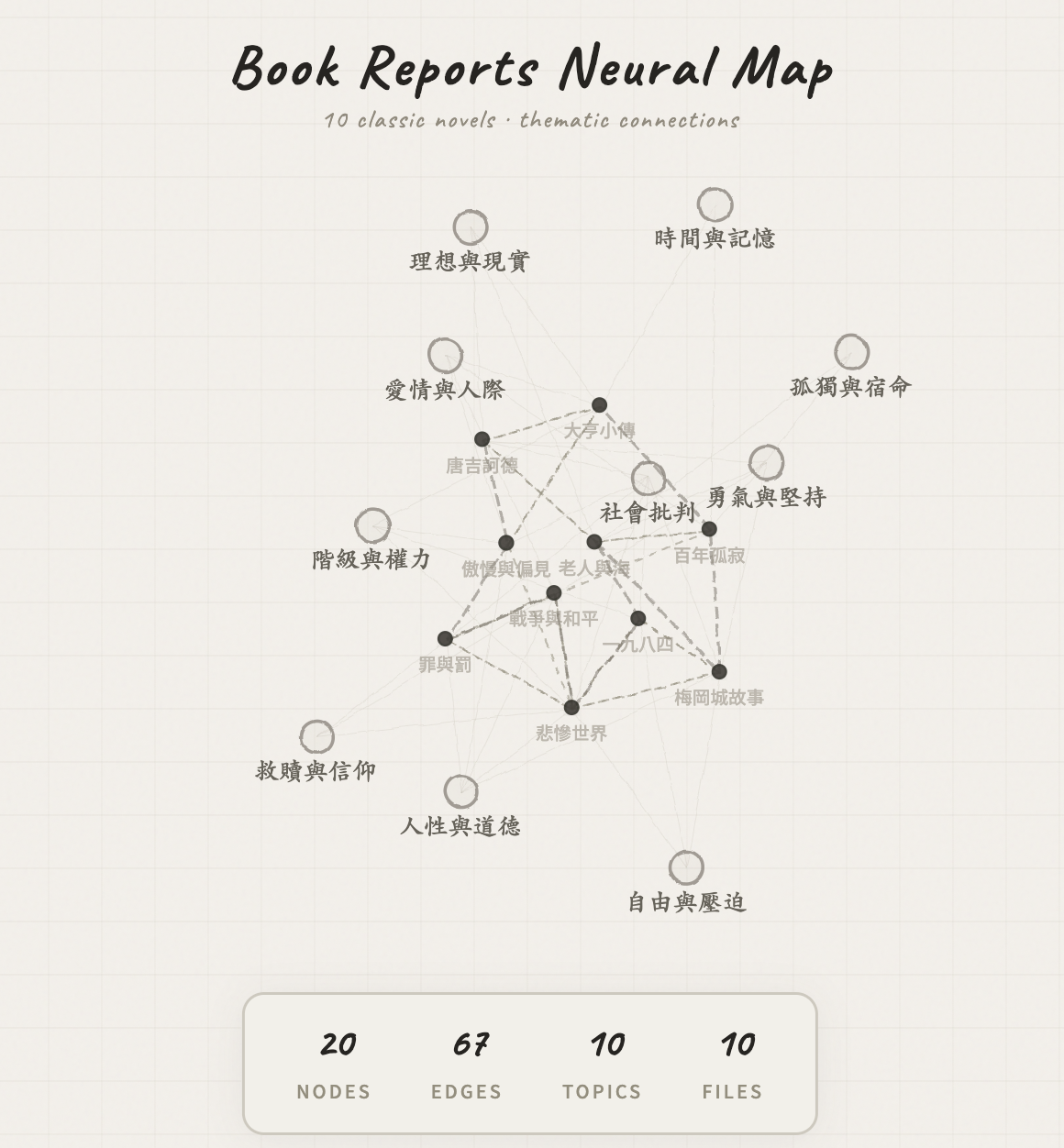
10 classic novels mapped as an interactive knowledge graph. But it works with any folder — notes, research, code, docs.
10 本經典文學的互動式知識圖譜。但它能吃任何資料夾——筆記、研究、程式碼、文件。
Why This Exists
You have notes, documents, research — scattered across folders. You know they’re connected, but you can’t see it.
Contextual Neural Map scans any folder, detects relationships between files, and renders them as an interactive force-directed graph. The output is a single .html file you can open in any browser — no server, no dependencies, no setup.
It looks like something out of a design portfolio. Because it should.
✦ Features
Hand-Drawn Notebook Aesthetic — Paper-white background with pencil-sketch styling. Cream tones, SVG filter effects for wobbly hand-drawn node edges, Caveat handwriting font for labels. Zero saturated colors. Opening it feels like flipping open a Moleskine.
Rich Interactions — Hover to highlight connections. Click to lock focus on a node. Drag to rearrange. Scroll to zoom. Real-time search filters nodes instantly. Legend toggles visibility by type.
Zero Dependencies, Single HTML File — The entire visualization is one self-contained HTML file. D3.js loads from CDN. Open it on any device, email it to anyone, host it anywhere.
Works With Any Folder — Markdown notes, research papers, project docs, course materials, codebases, writing projects. If there’s text in a folder, it can become a graph.
✦ Quick Start
Option A: Download the Skill (Recommended)
If you use Claude Cowork, download contextual-neural-map.skill and drop it into your skills folder.
Then just say “map this folder” or “draw a knowledge graph” — and it handles everything.
Option B: Use the Template Directly
- Clone this repo
- Prepare your data as the JSON structure described in
SKILL.md - Inject your data into
assets/template.html(replace the// __DATA_INJECT__block) - Open the resulting HTML in a browser
✦ How It Works
Your Folder                    Contextual Neural Map
┌─────────────────┐            ┌─────────────────────────────┐
│ 📄 doc-a.md     │            │  ○ Doc A                    │
│ 📄 doc-b.md     │  ──scan──▶ │    ╲                        │
│ 📄 doc-c.md     │  ──link──▶ │     ○ Doc B ── ○ Doc C      │
│ 📁 subfolder/   │  ──build─▶ │    ╱    ╲                   │
│   📄 doc-d.md   │            │  ◉ Topic    ○ Doc D         │
└─────────────────┘            └─────────────────────────────┘
                                → Single .html file output
- Scan — Recursively reads all files in the target folder
- Analyze — Extracts topics from headings, tags, and recurring keywords. Detects cross-references, shared themes, and sequential relationships
- Render — Injects the node/edge data into the D3.js template and outputs a self-contained HTML file
✦ Compared To
| Contextual Neural Map | Obsidian Graph View | vis.js / cytoscape.js | |
|---|---|---|---|
| Dependencies | None (single HTML file) | Full Obsidian app required | npm install + build step |
| Setup time | 0 seconds (open file) | 10+ minutes (install app, create vault) | 15+ minutes (npm, config, code) |
| Customizable | Full source access, edit HTML/CSS directly | Plugin API, limited styling | Full API, but complex config |
| Works offline | Yes | Yes | Yes (after build) |
| Hand-drawn aesthetic | Yes (unique pencil-sketch style) | No (standard UI) | No (standard UI) |
| Input format | Any folder with text files | Obsidian vault only | Requires structured JSON data |
| Shareable | Email the HTML file to anyone | Recipient needs Obsidian | Requires hosting |
Contextual Neural Map is best for visualizing any folder as a standalone, shareable knowledge graph with zero setup. If you need a full personal knowledge management app with daily notes, backlinks, and plugins, Obsidian is the way to go. If you need a programmable graph visualization library for a web app, vis.js or cytoscape.js are better fits.
✦ FAQ
Can I use this without Obsidian? Yes. Contextual Neural Map is a standalone tool. It works with any folder containing text files — no Obsidian required.
Does it need a server? No. The output is a single self-contained HTML file. Open it directly in any browser.
What file types does it support?
Markdown (.md), plain text, and any text-based file. It extracts topics from headings, frontmatter tags, and recurring keywords.
How do I customize the visual style? Edit the HTML template directly. Background colors, node colors, fonts, sizing formulas, and force layout parameters are all configurable. See the Customization section.
Is it open source? Yes — MIT. Use it however you want.
✦ Gallery
The examples/ folder uses 10 classic novels as a demo — but that’s just one use case. Swap in your research papers, project docs, meeting notes, or codebase, and it maps them the same way.
| File | Description |
|---|---|
demo.html |
The generated graph — open in browser |
01-傲慢與偏見.md |
Pride and Prejudice |
02-一九八四.md |
1984 |
03-唐吉訶德.md |
Don Quixote |
04-罪與罰.md |
Crime and Punishment |
05-百年孤寂.md |
One Hundred Years of Solitude |
06-大亨小傳.md |
The Great Gatsby |
07-戰爭與和平.md |
War and Peace |
08-悲慘世界.md |
Les Misérables |
09-梅岡城故事.md |
To Kill a Mockingbird |
10-老人與海.md |
The Old Man and the Sea |
Try it yourself: Download
demo.htmland open it in your browser. No installation needed.
✦ Customization
| Want to change… | Where |
|---|---|
| Background color | body { background: #xxx } in template |
| Node colors | nodeEls fill/stroke values |
| Fonts | @import url(...) and font-family |
| Node sizing | Math.sqrt(d.weight / N) — adjust N |
| Force layout | simulation.force(...) distance/strength/charge |
| New edge type | Add type to links data + matching stroke style |
✦ Use Cases
- Personal Knowledge Bases — Map your Obsidian vault exports, Notion exports, or Zettelkasten notes
- Academic Research — Visualize paper collections and discover citation clusters
- Project Documentation — See how your docs relate at a glance
- Course Materials — Map prerequisites and topic dependencies
- Writing Projects — Track character arcs, plot threads, and chapter structure
中文版
為什麼做這個
你的筆記、文件、研究散落在各個資料夾裡。你知道它們之間有關聯,但你看不到。
Contextual Neural Map 掃描任意資料夾,偵測檔案之間的關係,然後渲染成一張互動式力導向圖。產出是一個獨立的 .html 檔案,用任何瀏覽器直接開——不需要伺服器、不需要安裝、不需要設定。
它看起來就像設計師的作品集裡會出現的東西。因為本來就該這樣。
✦ 功能特色
手繪筆記本美學 — 奶白色紙張背景搭配鉛筆手繪風格。奶油色調、SVG 濾鏡製造的手繪歪斜節點邊緣、Caveat 手寫字體標籤。零飽和色彩。打開它的感覺就像翻開一本 Moleskine 筆記本。
豐富互動 — 滑鼠懸停高亮連結關係、點擊鎖定焦點、拖曳重新排列節點、滾輪縮放、搜尋框即時篩選、圖例點擊切換顯示類型。
零依賴,單一 HTML 檔案 — 整個視覺化就是一個獨立的 HTML 檔案。D3.js 從 CDN 載入。任何裝置都能開,寄 email 給任何人,放在任何地方都能用。
萬物皆可圖 — Markdown 筆記、研究論文、專案文件、課程教材、程式碼庫、寫作專案。只要資料夾裡有文字檔,就能畫成圖。
✦ 快速開始
方法 A:下載 Skill(推薦)
如果你用 Claude Cowork,下載 contextual-neural-map.skill 拖進 skills 資料夾就好。
然後直接說 「畫關係圖」 或 「draw a knowledge graph」 — 剩下的它全搞定。
方法 B:直接用模板
- Clone 這個 repo
- 按照
SKILL.md裡的 JSON 結構準備你的資料 - 把資料注入
assets/template.html(取代// __DATA_INJECT__區塊) - 用瀏覽器打開生成的 HTML
✦ 運作原理
你的資料夾                       Contextual Neural Map
┌─────────────────┐            ┌─────────────────────────────┐
│ 📄 doc-a.md     │            │  ○ Doc A                    │
│ 📄 doc-b.md     │  ──掃描──▶ │    ╲                        │
│ 📄 doc-c.md     │  ──連結──▶ │     ○ Doc B ── ○ Doc C      │
│ 📁 subfolder/   │  ──建構──▶ │    ╱    ╲                   │
│   📄 doc-d.md   │            │  ◉ 主題    ○ Doc D          │
└─────────────────┘            └─────────────────────────────┘
                                → 單一 .html 檔案輸出
- 掃描 — 遞迴讀取目標資料夾中的所有檔案
- 分析 — 從標題、標籤和重複出現的關鍵詞中提取主題。偵測交叉引用、共享主題和序列關係
- 渲染 — 將節點/邊資料注入 D3.js 模板,輸出獨立的 HTML 檔案
✦ 比較
| Contextual Neural Map | Obsidian Graph View | vis.js / cytoscape.js | |
|---|---|---|---|
| 依賴 | 零(單一 HTML 檔) | 需要完整 Obsidian app | npm install + 建置 |
| 設定時間 | 0 秒(開檔即用) | 10 分鐘以上 | 15 分鐘以上 |
| 可自訂 | 直接改 HTML/CSS | Plugin API,樣式有限 | 完整 API,但設定複雜 |
| 離線使用 | 是 | 是 | 是(建置後) |
| 手繪美學 | 有(獨家鉛筆手繪風) | 無 | 無 |
| 輸入格式 | 任何含文字檔的資料夾 | 僅限 Obsidian vault | 需要結構化 JSON |
| 可分享 | 寄 HTML 給任何人 | 對方也要裝 Obsidian | 需要架站 |
Contextual Neural Map 最適合把任意資料夾視覺化成獨立、可分享的知識圖譜,零設定直接用。如果你需要完整的個人知識管理 app(日記、雙向連結、插件),Obsidian 是更好的選擇。如果你需要可程式化的圖形視覺化函式庫來嵌入 web app,vis.js 或 cytoscape.js 更適合。
✦ 常見問題
不用裝 Obsidian 就能用嗎? 可以。Contextual Neural Map 是獨立工具,只要資料夾裡有文字檔就能用,不需要 Obsidian。
需要伺服器嗎? 不需要。產出是單一獨立 HTML 檔案,任何瀏覽器直接開。
支援哪些檔案格式?
Markdown(.md)、純文字,以及任何文字型檔案。會從標題、frontmatter 標籤和重複關鍵詞中提取主題。
怎麼自訂視覺風格? 直接改 HTML 模板。背景色、節點顏色、字型、大小公式、力導向參數都可調。見 自訂樣式 章節。
是開源的嗎? 是——MIT。隨便你怎麼用。
✦ 範例展示
examples/ 用 10 本經典文學當範例——但這只是其中一種用法。換成你的讀書筆記、工作文件、研究論文,一樣能畫。重點不是「文學」,是「關聯」。
| 檔案 | 說明 |
|---|---|
demo.html |
生成的圖譜——用瀏覽器打開 |
01-傲慢與偏見.md |
Pride and Prejudice |
02-一九八四.md |
1984 |
03-唐吉訶德.md |
Don Quixote |
04-罪與罰.md |
Crime and Punishment |
05-百年孤寂.md |
One Hundred Years of Solitude |
06-大亨小傳.md |
The Great Gatsby |
07-戰爭與和平.md |
War and Peace |
08-悲慘世界.md |
Les Misérables |
09-梅岡城故事.md |
To Kill a Mockingbird |
10-老人與海.md |
The Old Man and the Sea |
試試看: 下載
demo.html直接用瀏覽器打開。不用安裝任何東西。
✦ 自訂樣式
| 想改什麼 | 去哪改 |
|---|---|
| 背景色 | template 裡的 body { background: #xxx } |
| 節點顏色 | nodeEls 的 fill/stroke 值 |
| 字型 | @import url(...) 和 font-family |
| 節點大小 | Math.sqrt(d.weight / N) — 調 N |
| 力導向參數 | simulation.force(...) 的 distance/strength/charge |
| 新增邊類型 | 在 links 資料加 type + 對應的 stroke 樣式 |
✦ 適用場景
- 個人知識庫 — 把你的 Obsidian vault 匯出、Notion 匯出、或 Zettelkasten 筆記視覺化
- 學術研究 — 視覺化論文集,發現引用叢集
- 專案文件 — 一眼看出文件之間的關聯
- 課程教材 — 繪製先修課程和主題依賴關係
- 寫作專案 — 追蹤角色弧線、劇情線索和章節結構
✦ Project Structure
contextual-neural-map/
├── README.md                          # You are here
├── LICENSE                            # MIT
├── SKILL.md                           # Full skill definition & workflow
├── contextual-neural-map.skill        # One-click install for Cowork
├── assets/
│   ├── banner.svg                     # README header banner
│   ├── demo-screenshot.png            # Demo screenshot
│   └── template.html                  # D3.js visualization engine
└── examples/
    ├── demo.html                      # Generated graph (open in browser)
    ├── 01-傲慢與偏見.md                 # Source: Pride and Prejudice
    ├── 02-一九八四.md                   # Source: 1984
    └── ...                            # 10 classic novels total
✦ License
MIT — Use it however you want. 隨便你怎麼用。
Built with D3.js. Inspired by Obsidian's Graph View.
If this made you go "oh that's pretty" — consider giving it a ⭐